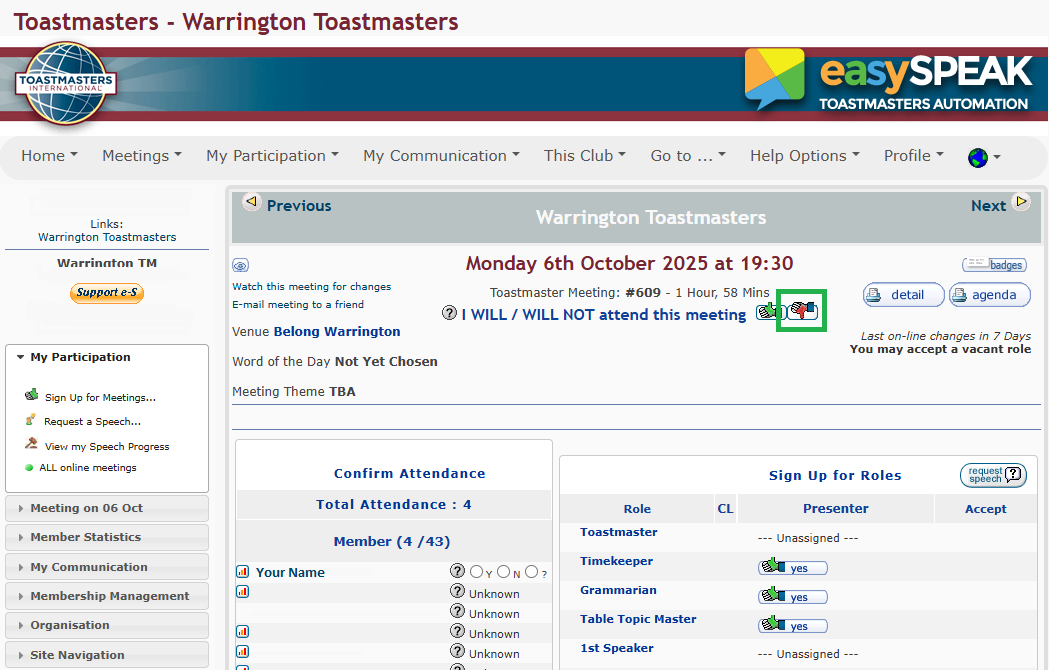
Follow these steps to accept a meeting role in EasySpeak:
Log in to EasySpeak
- Go to the EasySpeak website: https://toastmasterclub.org/
- Enter your username and password, then click the Log in button.
Please note: Your login details for the EasySpeak website are separate from the login details for the Toastmasters International website.

Find the Meeting Details Page
- On the home page, go to Meetings.
- Click the date of the meeting you want to view. The date of the next meeting is usually shown in the drop-down menu.

Accepting a Role
- The Meeting Details Page will show the list of roles (Toastmaster, Timekeeper, Grammarian, etc.).
- Next to each role, you’ll see whether the role is assigned or unassigned.
- If the role is unassigned, you can click the yes button to accept that role.
Please note: The Toastmaster and Speaker roles cannot be accepted until you been assigned to the role. Please speak to the VP of Education first. Once you are assigned as Toastmaster or Speaker you can return to this page and accept the role.

Confirm Your Attendance
- If you cannot attend a meeting, you can mark yourself as Not Attending by clicking on the red Thumbs Down button.